
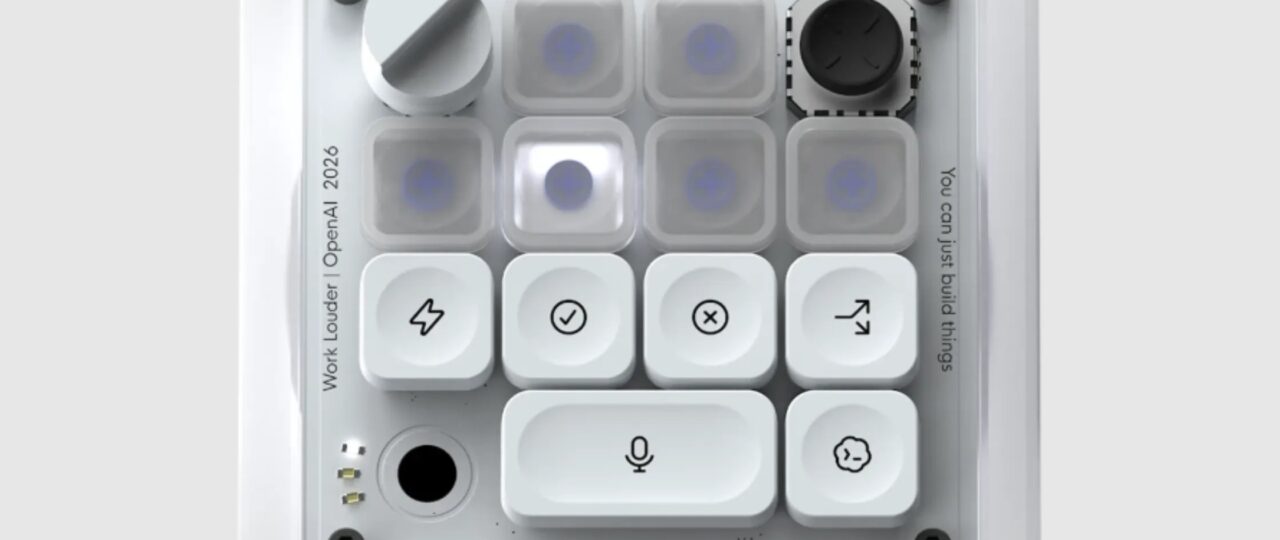
Until the legal battle works itself out and OpenAI’s broader hardware ambitions materialize, the most the startup has to offer is Micro — a funky little keypad clearly engineered to delight the tech industry’s code monkeys.
OpenAI sent TechCrunch a Micro test unit. The first big thing you notice when initially handling the keypad is that it’s a sturdy little device — enough so that if the AI accessory thing doesn’t end up working out, it could easily double as a paperweight. The other thing you might notice (and I am not the only one to point this out), is that the packaging — an immaculate white box with a sleek, clean aesthetic — is pretty Apple-coded. Make of that what you will.
The keypad’s layout involves six frosted “agent” keys at the top of the pad, which can be customized to carry out specific tasks within ChatGPT or its agentic coding tool Codex. Below them are six command keys, which can be used to control those programs. You can pair your Micro with your computer either through a Bluetooth connection or a USB cable.
Perhaps the most convenient thing Micro offers is a button for voice dictation — meaning you simply tell the app what you want done and it will get busy working on your behalf. Just hold down the dictation button and start talking. When you’re done, tap the “send” button next to it to submit your request.
You can customize your Micro keypad within ChatGPT itself, where a Micro tab allows you to adjust everything from the brightness of the light from the keys to the specific commands and projects you want tied to those keys.
Coders — the device’s actual target audience — haven’t exactly embraced it. Reviews by Redditors have largely negative, with one Reddit user calling it “a prank and not a real product,” and others saying serious coders won’t touch it. A review by the smaller independent outlet Aftermath was even harsher, calling the $230 price tag hard to justify next to cheaper DIY and off-the-shelf alternatives. (The title of that review: “OpenAI’s expensive macropad feels engineered to piss me off specifically.”)
It’s definitely the case that new users may need some time to figure out how Micro works and what to do with it.
Once I figured out how to program the keypad to my liking, I found it was actually pretty fun. You can assign various ChatGPT sessions to specific keys, which then allows you to easily toggle back and forth between all of your various projects. When you combine that with the dictation button, it makes the whole experience considerably more efficient and enjoyable.
But there’s still a learning curve. Micro’s buttons are color-coded. White means an agent is idle, blue means its thinking, green means a task is complete, and red means there’s been an error. You’ll need to memorize that, along with memorizing which specific projects are coded to each key.
The big question is whether the Micro keypad is functionally easier to use than just continuing to work on your laptop. In short: Why would I spend a week learning how to program and operate this thing when I already know how to use my computer’s mouse and keyboard?
Ultimately, your experience with the Micro will depend heavily on how much you use ChatGPT. Since I don’t use AI much day to day, I’m probably not the target audience for it.
That said, if you’re a ChatGPT power user, have $230 to spare, and like vintage-looking hardware with clicky buttons, Micro probably isn’t the worst purchase you could make — it might even brighten your day a little.
Discover more from NAIRAVOICE.COM.NG
Subscribe to get the latest posts sent to your email.