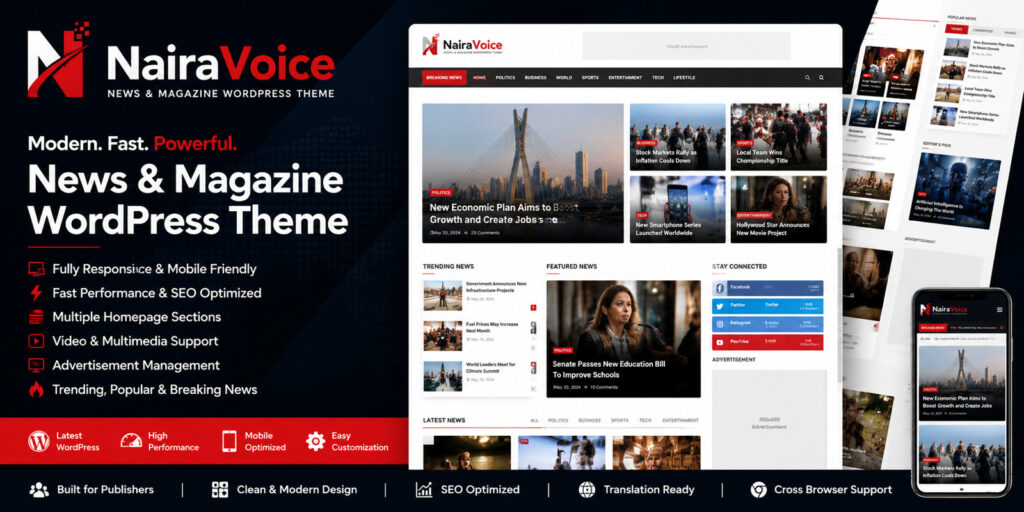
NairaVoice is a modern and feature-rich WordPress news and magazine theme designed for publishers, bloggers, media companies, and content creators.The theme provides a clean and professional layout optimized for content discovery, user engagement, and monetization. It includes multiple homepage sections, category-based content blocks, advertisement placements, video support, trending posts, breaking news ticker, social sharing, and SEO-friendly architecture.NairaVoice is fully responsive and works seamlessly across desktop, tablet, and mobile devices. The built-in theme options panel allows easy customization without coding.Whether you run a news portal, online magazine, blog, entertainment website, sports website, business publication, or niche content platform, NairaVoice provides everything needed to launch a professional publishing website.Built with performance, flexibility, and scalability in mind.✓ Modern news and magazine design
✓ Fully responsive layout
✓ Advanced homepage builder sections
✓ Breaking news ticker
✓ Featured posts section
✓ Category-based content blocks
✓ Video content support
✓ Trending and popular posts
✓ Advertisement management system
✓ Header, footer and body ad placements
✓ Social media integration
✓ SEO optimized structure
✓ Fast loading performance
✓ Custom theme options panel
✓ Unlimited categories
✓ Mobile-friendly design
✓ Sidebar widgets
✓ Related posts
✓ Author pages
✓ Archive pages
✓ Search functionality
✓ Clean and organized code
✓ Translation ready
✓ Cross-browser compatibleWordPress 6.0 or higherPHP 8.0 or higherMySQL 5.7+ or MariaDB equivalentModern web browserWeb hosting with WordPress support1. Upload the NairaVoice theme ZIP file through Appearance → Themes → Add New.2. Activate the theme.3. After activation, a new “NairaVoice Manager” menu will appear in the WordPress admin dashboard. This menu is separate from the default Appearance → Customize section.4. Open NairaVoice Manager to configure:
– General Settings
– Homepage Settings
– Advertisement Settings
– Header Settings
– Footer Settings
– Social Media Links
– Scripts & Integrations5. Create your categories and publish posts.6. Configure menus from Appearance → Menus.7. Configure widgets from Appearance → Widgets.8. Homepage sections are category-based. To change which categories appear in specific homepage sections, edit the homepage template file:/wp-content/themes/nairavoice-theme/front-page.phpUpdate the category IDs, category slugs, or query parameters used in the section you want to modify.9. Configure advertisement codes inside NairaVoice Manager → Ads Settings.10. Set your logo, favicon, social links, and footer content from NairaVoice Manager.11. Clear any cache after making major changes.12. The theme is fully responsive and optimized for desktop, tablet, and mobile devices.
Discover more from NAIRAVOICE.COM.NG
Subscribe to get the latest posts sent to your email.